The Edit Prompt Formula: Action, Preserve, Result, Avoid
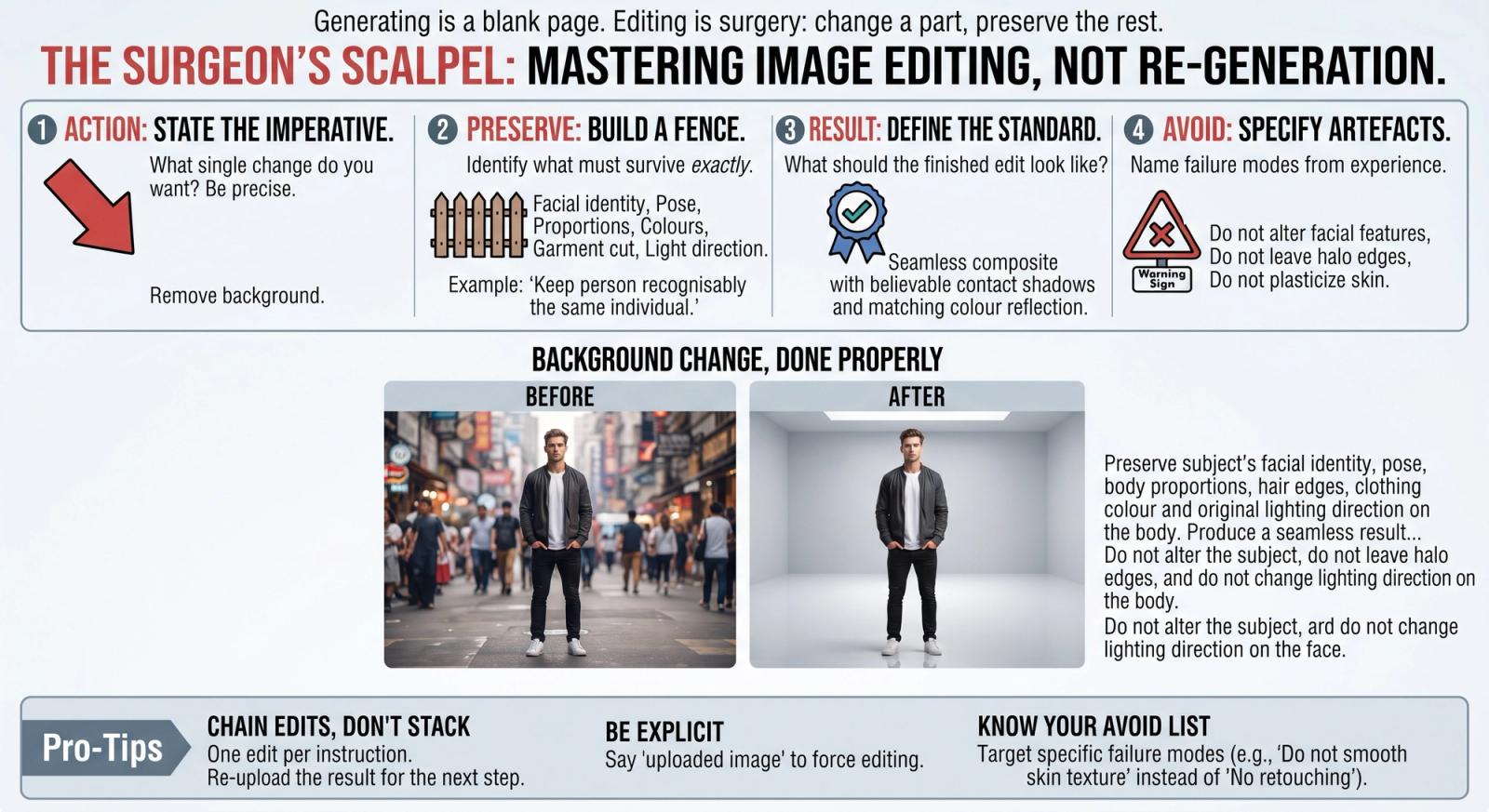
Generating an image is a blank page. Editing one is surgery: something already exists and your job is to change a part of it without disturbing the rest. That difference explains why prompts copied from a text-to-image workflow fail so badly when you paste them next to an uploaded photo. The model has no idea what is sacred, so it rewrites your subject's face while dutifully changing the background you asked about.
Four Parts, Every Time
Every reliable editing instruction answers four questions in order: what should change, what must stay exactly as it is, what the finished image should look like, and what failure modes to avoid. Miss the second part and you will spend your afternoon regenerating.
- Action: the single change you want, stated as an imperative.
- Preserve: the identity, geometry and colours that must survive untouched.
- Result: the standard the finished image should meet.
- Avoid: the specific artefacts this kind of edit tends to produce.
The Formula: [Action: change X]. Preserve [identity, pose, proportions, colours, edges] exactly as in the original. Produce [the finished standard]. Do not [the usual failure modes for this edit].
Why 'Preserve' Does the Heavy Lifting
Models interpret an edit request as permission to re-render the whole frame. The preserve clause is a fence. Be concrete about what is inside it: facial identity, body proportions, garment cut and colour, logo placement, the direction the light is coming from. For portraits, the phrase 'keep the person recognisably the same individual' is worth more than a paragraph of politeness.
Background Change, Done Properly: Replace the background of the uploaded image with a bright modern studio in soft grey. Preserve the subject's facial identity, pose, body proportions, hair edges, clothing colour and the original lighting direction on the body. Produce a seamless result with believable contact shadows and matching colour reflection from the new scene. Do not alter the subject, do not leave halo edges, and do not change the lighting direction on the face.
One Edit Per Instruction
Asking to remove a background, brighten the exposure, change the outfit and add a logo in one message produces a compromise on all four. Chain them instead: run the structural edit first (backgrounds, objects, composition), then the tonal edit (exposure, colour), then the cosmetic edit (retouching, texture). Each step gets a clean preserve clause referencing the image as it now stands.
Write the Avoid List From Experience
Different edits fail in different ways. Background swaps produce halos and mismatched light. Retouching produces plastic skin. Outfit changes distort body proportions. Restorations invent faces. Keep a short avoid list per edit type rather than one giant catch-all — a targeted 'do not smooth the skin texture' beats twenty generic negatives.
- Say 'uploaded image' explicitly so the model edits rather than generates something new.
- Name the output use ('for an e-commerce listing') — it sets a quality bar the model understands.
- If a detail matters, mention it twice: once in preserve, once in avoid.
- Re-upload the edited result for the next step rather than stacking requests on the original.
Action, preserve, result, avoid. Four clauses, thirty seconds to write, and the difference between an edit that ships and an afternoon of regenerating.