18 Best AI Image Generators in 2026: Free and Paid Tools Compared
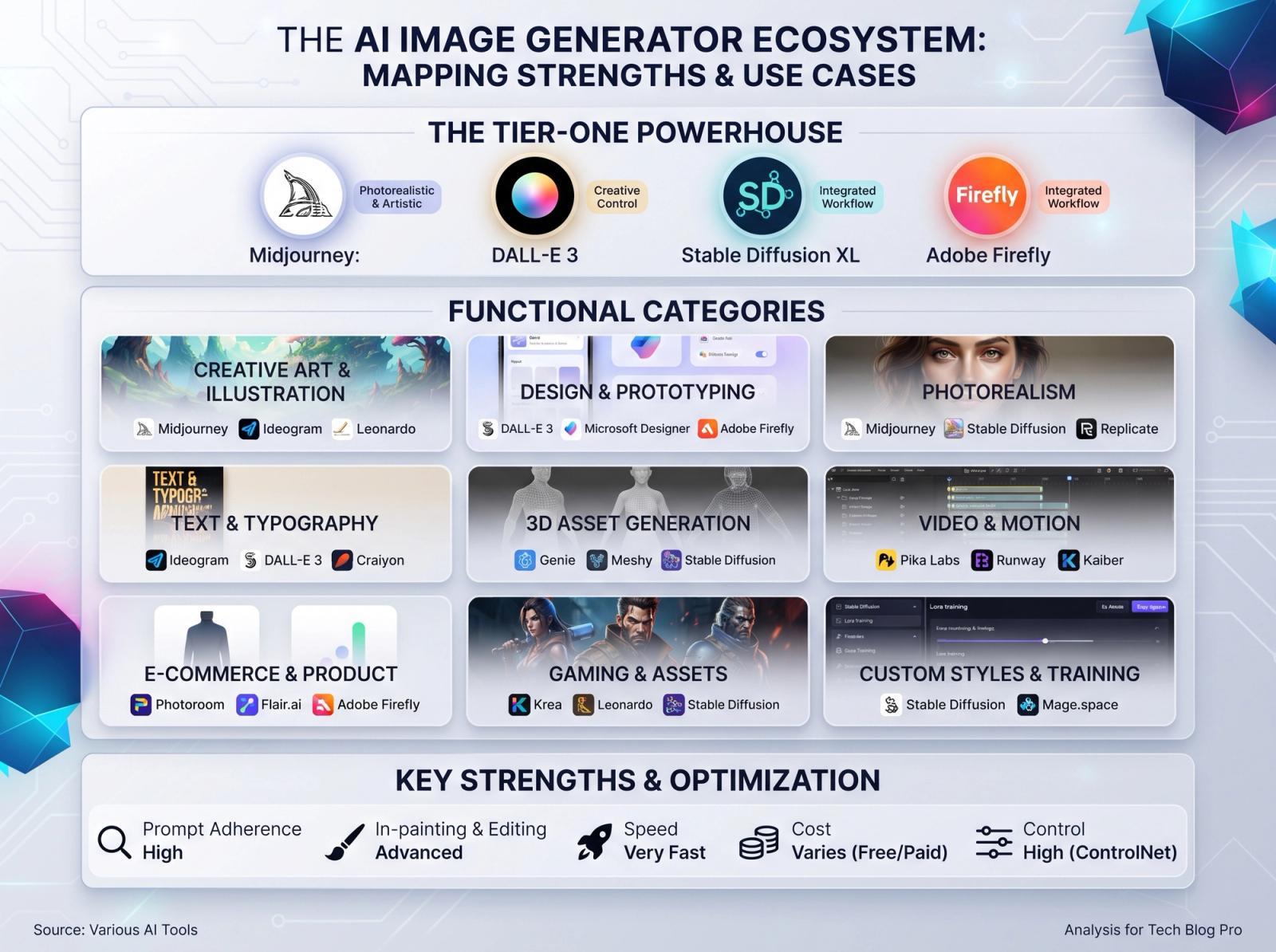
There is no single best AI image generator, only the right one for the job in front of you. A product shot for a storefront, a moodboard for a pitch, a character that has to look identical across twelve frames, and a portrait that must pass as a real photograph all reward different tools. This guide maps the 18 generators worth knowing in 2026: what each is genuinely good at, which offer a usable free tier, and what paying actually buys.
How to Read This List
Every tool below is tagged Free, Freemium or Paid. Free means you can produce usable images without a card; freemium means a monthly or daily credit allowance with paid tiers above it; paid means a subscription is required for anything serious. Credit allowances and prices change constantly in this category, so check the current plan before you subscribe — the strengths described here are far more stable than the pricing.
The Best Free and Freemium AI Image Generators
Free tiers are now good enough for learning prompt craft, testing a concept and producing a handful of images a week. Where they hurt is volume, consistency and commercial licensing — the three things that matter once images become deliverables.
- ChatGPT (GPT Image) (Freemium) — Best for conversational refinement and editing an image you already have. Follows long, specific instructions better than almost anything else, which suits precise briefs.
- Google Gemini (Freemium) — Strong photorealism and excellent at following edit instructions on an uploaded photo. The natural pair for Gemini users already in Google's ecosystem.
- Microsoft Designer (Free) — Free image generation wrapped in a simple layout tool — handy when the output goes straight into a social post or banner.
- Leonardo AI (Freemium) — Daily free credits, fine-tuned style models and a proper editing canvas. A good middle ground between chat tools and Midjourney.
- Krea AI (Freemium) — Real-time generation and enhancement, with an upscaler that rescues soft or low-resolution images.
- Playground (Freemium) — Generous free generations and templates aimed at graphics, social posts and simple product imagery.
- Ideogram (Freemium) — The strongest option when the image must contain readable text — posters, packaging mockups, logos and signage.
- NightCafe (Freemium) — Multiple models in one place with a daily credit drip and an active community, which makes it a cheap way to compare model looks.
- Stable Diffusion (Stability AI) (Free) — Run it locally for unlimited, private, zero-cost generation with total control — at the cost of a capable GPU and setup time.
- FLUX (Black Forest Labs) (Freemium) — Open-weight models with excellent prompt adherence and anatomy; available locally and through many hosted studios.
- Manus (Freemium) — Generates from a pasted prompt and keeps the whole photo, edit and video workflow in one conversation.
The Best Paid AI Image Generators
Paid plans rarely buy a magically better picture. They buy throughput, resolution, licensing clarity and control: reference images for consistent characters, in-painting for local edits, upscaling, brand kits and batch generation. If your images earn money, those features cost less than one reshoot.
- Midjourney (Paid) — Still the strongest default aesthetic for editorial, fashion and concept work. Style references and character references keep a look consistent across a campaign.
- Adobe Firefly (Freemium) — Trained for commercial safety and built into Photoshop and Express — the pragmatic choice for client work where licensing questions matter.
- Recraft (Freemium) — Built for designers: vector output, brand style sets and precise control over layout and text placement.
- Freepik AI (Freemium) — Several models behind one subscription, bundled with stock assets — good value if you already license stock.
- Canva Magic Media (Freemium) — Generation inside the design tool your team already uses, which removes the export-and-import shuffle entirely.
- Getimg.ai (Freemium) — A toolbox approach: many models, in-painting, upscaling and an API, with pay-as-you-go pricing.
- Photoroom (Freemium) — Purpose-built for product photography: background removal and replacement, shadows and batch e-commerce output.
Which Tool for Which Job
Match the tool to the output rather than to the hype cycle. For photorealistic product and portrait work with a precise brief, use something that follows instructions literally and supports editing — ChatGPT, Gemini or Firefly. For striking, stylised imagery where you want the model to bring taste, Midjourney still leads. For anything that must match a brand across dozens of assets, choose a tool with style and character references and pay for it. For posters and packaging where words appear in the image, use Ideogram or Recraft.
- Product and e-commerce: Photoroom, Firefly, ChatGPT.
- Editorial, fashion and concept art: Midjourney, FLUX, Leonardo.
- Text inside the image: Ideogram, Recraft.
- Unlimited volume and privacy: local Stable Diffusion or FLUX.
- Fast social graphics: Canva, Microsoft Designer, Playground.
What Actually Separates Good Output From Bad
Across every tool on this page, the prompt matters more than the model. Lead with the subject and one defining detail, then the environment, then the light, then the camera, then the finish. Name real equipment instead of superlatives — 'shot on an 85mm lens at f/1.8' does something; 'high quality, 4k' does not. Then change one variable at a time so you learn what each term actually does.
Portable Prompt Skeleton: [subject with one defining detail], [environment: surface, background, one prop], [light: direction + quality + colour], shot on [camera] with a [focal length] lens at [aperture], [finish: grade, grain, sharpness], photorealistic, natural skin texture, believable contact shadows
Free Versus Paid: How to Decide
Stay on free tiers while you are learning, testing a concept, or producing fewer than a dozen images a month. Pay when one of three things becomes true: you need volume on a deadline, you need the same character, product or style to recur across many images, or the work is commercial and you need clear licensing. Those three needs — not image quality — are what subscriptions actually solve.
- Run the same prompt through two or three tools before subscribing; three generations usually make the winner obvious.
- Check the commercial licence for your plan before a client job — terms differ per tool and per tier.
- Free allowances reset on a cycle; schedule big batches for the start of yours.
- Save the settings that worked next to the prompt: model version, aspect ratio, seed.
- Keep a personal prompt library. It outperforms any preset pack you can buy.
Pricing, credits and model versions move monthly in this category, so treat the tags above as a starting point and confirm the current terms before paying. The prompt craft, though, is portable — and it is what separates usable images from near misses, whichever generator you land on.