From Sora to Kling: 18 AI Video Tools Worth Your Credits
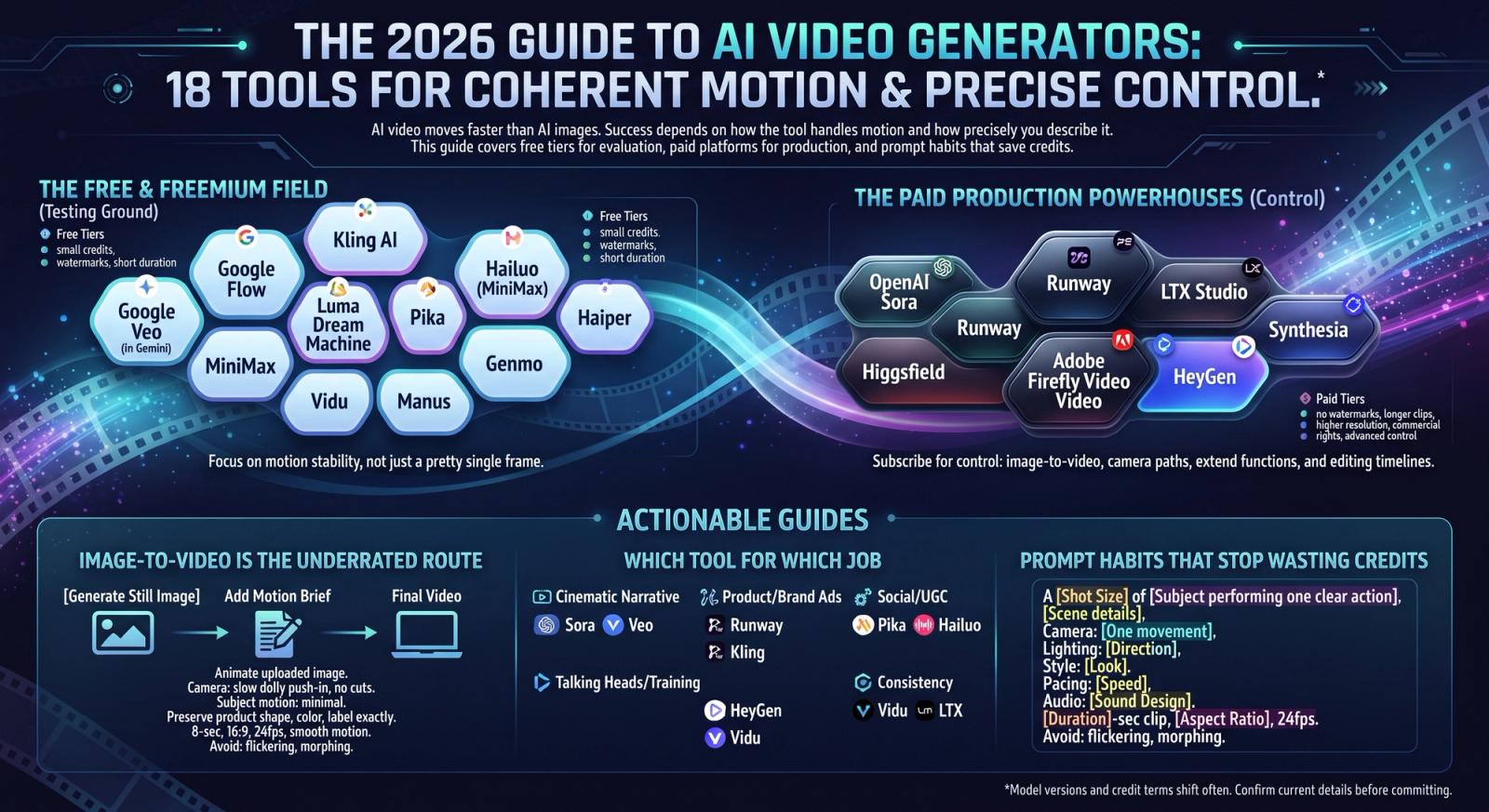
AI video moves faster than AI images, and the gap between a clip you can publish and one you quietly delete comes down to two things: how the tool handles motion, and how precisely you described that motion. This guide covers the 18 video generators worth knowing in 2026 — the free tiers that are genuinely useful, the paid platforms built for production, and the prompt habits that stop you burning credits on morphing faces.
How to Read This List
Tools are tagged Free, Freemium or Paid. In video, free almost always means a small monthly credit allowance, a watermark, and shorter maximum durations — enough to evaluate a model, not to run a content calendar. Credit costs change often, so confirm current terms before committing.
The Best Free and Freemium AI Video Generators
Treat free credits as a testing ground. Run one identical prompt through several tools, watch how each handles a push-in and a human face, and judge motion stability rather than which single frame looks prettiest.
- Google Veo (in Gemini) (Freemium) — Among the most coherent motion available, and it generates synchronised audio — dialogue, ambience and effects — which no other mainstream tool does as well.
- Google Flow (Freemium) — Google's filmmaking front-end for Veo: scene building, camera controls and shot extension for stitching sequences.
- Kling AI (Freemium) — Daily free credits and excellent physical motion, with start and end frame control that makes movement predictable.
- Hailuo (MiniMax) (Freemium) — Fast, characterful motion with a generous free allowance; strong at stylised and character-led clips.
- MiniMax (Freemium) — The model platform behind Hailuo, with API access for teams that want to automate generation.
- Luma Dream Machine (Freemium) — Natural camera movement and reliable image-to-video, which makes it a safe choice for animating a still you already like.
- Pika (Freemium) — Playful effects and quick iteration — good for social content and for learning how motion prompts behave.
- Haiper (Freemium) — Simple interface with a usable free tier; fine for short looping clips and quick tests.
- Genmo (Freemium) — Open-weight video generation you can also run yourself, which matters for privacy-sensitive or high-volume work.
- Vidu (Freemium) — Reference-to-video keeps a character or product consistent across several clips — useful for series content.
- Manus (Freemium) — Turns the prompt you built for a still into a video brief, keeping photo, edit and motion in one workflow.
The Best Paid AI Video Platforms
Paying removes watermarks and raises the ceiling — longer clips, higher resolution, faster queues and commercial rights — but the real reason to subscribe is control: image-to-video from your own frame, start and end frames, camera paths, extend functions and editing timelines.
- OpenAI Sora (Paid) — Exceptional scene coherence and prompt understanding, with remix and storyboard tools. Bundled with ChatGPT's paid plans.
- Runway (Freemium) — The most complete production ecosystem around the generator: motion brush, camera controls, in-painting and a proper editor.
- LTX Studio (Freemium) — Built for storyboarding entire narratives — script to shot list to clips, with character consistency across scenes.
- Higgsfield (Freemium) — Cinematic camera-move presets — dolly, crane, bullet time — for people who think in shots rather than prompts.
- Adobe Firefly Video (Freemium) — Commercially safe generation that drops straight into Premiere Pro, which matters for client and broadcast work.
- HeyGen (Freemium) — Avatar and talking-head video with translation and lip sync — a different job from cinematic generation, and the best tool for it.
- Synthesia (Paid) — Enterprise-grade avatar video for training, onboarding and internal comms, with brand controls and many languages.
Image-to-Video Is the Underrated Route
The most reliable path to a controlled clip is to generate a still you are happy with, then animate it. You keep full control of composition, product accuracy and lighting in the image stage, where iteration is cheap, and ask the video model only to add motion. For product and brand work this consistently beats text-to-video from a blank page.
Image-to-Video Motion Brief: Animate the uploaded image. Camera: slow dolly push-in toward the subject over the full clip, no cuts. Subject motion: minimal — only the light sweep and a gentle drift of the background haze. Preserve the product's shape, colour, label and reflections exactly. 8-second clip, 16:9, 24fps, smooth natural motion, temporally consistent lighting. Avoid: flickering, morphing, warping, distorted text, on-screen captions.
Which Tool for Which Job
- Cinematic narrative: Sora, Veo, Flow, LTX Studio.
- Product and brand ads: Runway, Kling, Luma, Firefly Video.
- Social and UGC-style clips: Pika, Hailuo, Haiper.
- Talking heads, training and localisation: HeyGen, Synthesia.
- Character or product consistency across clips: Vidu, LTX Studio, Kling.
Prompt Habits That Stop Wasting Credits
Video failures are predictable: subjects morph, backgrounds flicker, limbs multiply and clips end mid-movement. One action and one camera move per clip prevents most of it. Naming the frame rate and asking for temporal consistency prevents more. Keeping a fixed avoid list across every generation lets you compare tools fairly instead of blaming the model for your prompt.
Text-to-Video Skeleton: A [shot size] of [subject performing one clear action]. [Scene with one or two grounding details]. Camera: [one movement]. Lighting: [direction and quality]. Style: [look and grade]. Pacing: [speed]. Audio: [sound design]. [Duration]-second clip, [aspect ratio], 24fps, smooth natural motion, temporally consistent. Avoid: flickering, morphing, warping, sudden jump cuts, distorted anatomy, on-screen text.
Free Versus Paid: How to Decide
Stay free while you are learning what each model does with motion. Pay once you need clips without watermarks, longer durations, commercial rights, or the control features that make output repeatable. In production, consistency is the feature you are actually buying — the tool that loses the fewest clips wins, even if a rival occasionally produces a prettier frame.
- Shorter is safer: two clean five-second clips beat one drifting fifteen-second attempt.
- Generate three variations of every prompt — video output varies far more than stills.
- Cut sequences from separate clips instead of asking one generation for multiple shots.
- Keep lighting and style wording identical across a sequence so clips match in the edit.
- Check watermark and licence terms before building a client deliverable on a free tier.
Model versions, credit allowances and pricing shift almost monthly in this category, so confirm current terms before subscribing. The prompt structure underneath, though, stays the same across every tool on this list — and it is what makes any of them usable.